Tampilkan postingan dengan label Cara Instal. Tampilkan semua postingan

Easy Way to Hack WEP/WPA/WPA2 Wi-Fi Password

Written By IWANCIANJUR1 on Kamis, 27 Desember 2012 | 23.27

Kamis, 27 Desember 2012

How to Hack WEP/WPA/WPA2 Wi-Fi Password

 Easy Way to Hack WEP/WPA/WPA2 Wi-Fi Password,wifi hacking,Easy Way to Hack WEP/WPA/WPA2 Wi-Fi Password.pdf,Easy Way to Hack WEP/WPA/WPA2 Wi-Fi Password pdf book,how to Hack WEP/WPA/WPA2 Wi-Fi Password
Easy Way to Hack WiFi Password

If you are living nearby someones WiFi hotspot and every time your laptop search for connection its showing up but you don't have passwords. Or you just want to steal someones WPA/WPA2 Wi-Fi hotspot key or passwords. Don't worry...

In this tutorial I’ll show How to hack a WPA/WPA2 Wi-Ficonnection through a bootable USB.
Things you should need:

1. A USB pen drive.
2. beini.iso file. [Download it from HERE].

3. UNetbootin software to make your USB drive bootable. [Download for WindowsLinux or Mac]
Some few steps you should to do ( WEP):
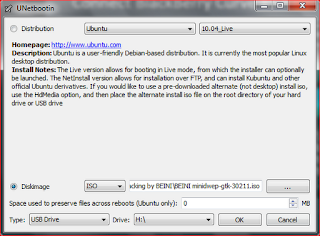
1. Write beini.iso on your USB by UNetbootin. Set everything according to this image bellow.

Easy Way to Hack WEP/WPA/WPA2 Wi-Fi Password,wifi hacking,Easy Way to Hack WEP/WPA/WPA2 Wi-Fi Password.pdf,Easy Way to Hack WEP/WPA/WPA2 Wi-Fi Password pdf book,how to Hack WEP/WPA/WPA2 Wi-Fi Password
2. After finishing restart your PC and boot it from your USB.

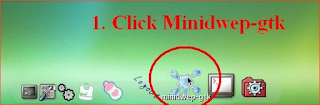
3. If you were successful to boot up then you should see something like this. Click Minidwep-gtk.
WiFi Hacking2
4. Click OK.
Easy Way to Hack WEP/WPA/WPA2 Wi-Fi Password,wifi hacking,Easy Way to Hack WEP/WPA/WPA2 Wi-Fi Password.pdf,Easy Way to Hack WEP/WPA/WPA2 Wi-Fi Password pdf book,how to Hack WEP/WPA/WPA2 Wi-Fi Password
5. Now Minipwep-gtk  program will open. Click Scan.
Easy Way to Hack WEP/WPA/WPA2 Wi-Fi Password,wifi hacking,Easy Way to Hack WEP/WPA/WPA2 Wi-Fi Password.pdf,Easy Way to Hack WEP/WPA/WPA2 Wi-Fi Password pdf book,how to Hack WEP/WPA/WPA2 Wi-Fi Password
6. Select a wireless network(should have Clint) from the list. And click Lunch to start creaking process.
Easy Way to Hack WEP/WPA/WPA2 Wi-Fi Password,wifi hacking,Easy Way to Hack WEP/WPA/WPA2 Wi-Fi Password.pdf,Easy Way to Hack WEP/WPA/WPA2 Wi-Fi Password pdf book,how to Hack WEP/WPA/WPA2 Wi-Fi Password
7. Sometimes its take a while according to your victim connections IVS value and password strength. So keep passions.
Easy Way to Hack WEP/WPA/WPA2 Wi-Fi Password,wifi hacking,Easy Way to Hack WEP/WPA/WPA2 Wi-Fi Password.pdf,Easy Way to Hack WEP/WPA/WPA2 Wi-Fi Password pdf book,how to Hack WEP/WPA/WPA2 Wi-Fi Password
8. If it found a password, it should appear like this.
Easy Way to Hack WEP/WPA/WPA2 Wi-Fi Password,wifi hacking,Easy Way to Hack WEP/WPA/WPA2 Wi-Fi Password.pdf,Easy Way to Hack WEP/WPA/WPA2 Wi-Fi Password pdf book,how to Hack WEP/WPA/WPA2 Wi-Fi Password

To creak WPA/WPA2 follow this image instruction.

Easy Way to Hack WEP/WPA/WPA2 Wi-Fi Password,wifi hacking,Easy Way to Hack WEP/WPA/WPA2 Wi-Fi Password.pdf,Easy Way to Hack WEP/WPA/WPA2 Wi-Fi Password pdf book,how to Hack WEP/WPA/WPA2 Wi-Fi Password
Let me know if you have done it successfully or you have any complicity.
Link Download


Read More | komentar (1)

CARA INSTAL BOOT

Written By IWANCIANJUR1 on Rabu, 31 Oktober 2012 | 13.04

Rabu, 31 Oktober 2012

Complete Themes
A lot of the great artists submitting to this site are designing complete visual themes for Windows XP/2003 comprised of different components such as shellstyles, wallpapers, sounds, visual styles, screensavers, icons, and cursors. ThemeXP distributes not only complete themes, visual styles and wallpapers separately, but also has Windows XP logins and bootscreens, as well as icons (.iconsets). A visual theme will consist of a .theme file and several other elements of the authors choosing (from the items listed above), of which a visual style (.msstyles) file is mandatory. If there is a single self-installing executable file inside the download, just unzip it and install. If the files are separate, then there should be a .theme file and an associated folder with the visual style and other author inclusions inside the .zip, (if it's packaged correctly).Visual Styles
If your download only consists of a visual style (.msstyles) file inside the .zip, then open it using your favorite install software(Or the Windows default software in the Control Panel.
Logins The simplest and safest way to change a login screen is to use a quality third-party application. If you feel comfortable doing it manually though, here are some excellent instructions courtesy of bFarber Logins (bfarber.com).
  1. In Explorer, browse to C:\Windows\System32 and find the file named "logonui.exe".
  2. Rename "logonui.exe" to "logonui.exe.bak". This way if anything messes up...you have a backup.
  3. Place your new login in C:\WINDOWS\SYSTEM32 and rename it to logonui.exe.
  4. That's it! Now when you log off your new login screen will be there.
Wallpapers
  1. Download the wallpaper .zip file to your computer.
  2. Extract the .jpg file from the .zip and open it in Microsoft Windows Picture and Fax Viewer.
  3. Right-click on the image and choose "Set as Desktop Background".
  4. Your new wallpaper should appear as your desktop background.
Boot Screens
The simplest and safest way to change a boot screen is to also use a quality third-party application. If you feel comfortable doing it manually though, here are the complete instructions for doing so.
  1. In Explorer, browse to C:\Windows\System32 and find the file named "ntoskrnl.exe".
  2. Copy "ntoskrnl.exe" to "ntoskrnl.exe.bak", (COPY not RENAME). This way if anything goes wrong...you will have a backup.
  3. Extract the files inside the .zip file you downloaded to a temporary location of your hard drive, but NOT to C:\Windows\System32.
  4. Reboot your computer into Safe Mode (hit F8 before the boot screen appears) or into true DOS mode (from a boot disk)
  5. Browse to where you extracted the files for your new boot screen in Explorer and select the correct file to copy to C:\Windows\System32. If you have SP1 for Windows XP installed use ntoskrnlsp.exe, otherwise use ntoskrnl.exe. IT IS VERY IMPORTANT TO USE THE CORRECT FILE, OR YOUR SYSTEM WILL LOCK UP ON BOOT.
  6. If using ntoskrnl.exe, copy the file to C:\Windows\System32 overwriting the existing ntoskrnl.exe, (which should have been backed up).
  7. If you are going to use ntoskrnlsp.exe, delete ntoskrnl.exe in the temporary folder and rename ntoskrnlsp.exe to ntoskrnl.exe. Then copy the file to C:\Windows\System32 overwriting the existing ntoskrnl.exe, (which should have been backed up).
  8. All done! Reboot your computer as you normally would and enjoy your new boot screen.
IconSets
The only way to apply IconSets is to use Style XP 2.0 from TGTSoft. To work with an IconSet, start Style XP and click on the 'Icons' button. From there things should be pretty well self-explanatory using Apply,
Read More | komentar

Nvidia GeForce 8400M GS 8600M GS Windows 7 Driver

1. Download the following driver (for 32 bit select windows 7):

Windows 7: Download
Windows 7 64-bit : Download 2. Install it, if it resulting in error continue with next step. (it will create a nvidia folder in C)

3. Download this file inf file (After click the link you will be redirect to the download page - click modified inf to begin download):
197.16, here 32bit
197.16 here 64bit


4. Go to C:\NVIDIA\DisplayDriver\197.16\WinVista_Win7_32@64\English\Display.driver paste the INF we download in step 3 there. (if it prompt to replace the file select replace)

5. Then again go to C:\NVIDIA\DisplayDriver\197.16\WinVista_Win7_32@64\English and run setup. it will resulting prompt not recognize etc but continue with installation
Read More | komentar

Installing Nvidia Geforce8200 in CQ60 Guide

 Installing Nvidia Geforce8200 in CQ60 Guide
UPDATE...
NOTE:

THERE ARE TWO METHOD TO INSTALL IT IN WINDOWS XP.
1. MODDED DRIVERS
2. MANUAL INSTALLATION:

==================
1. MODDED DRIVERS
==================
The method below reported didn't work in some laptop, so here is the common drivers use to install the 8200 graphic:

go to this URL:
http://forums.laptopvideo2go.com/topic/24991-v18681-windows-xp-32bit-nvidia-oem/

OK, here is some advance installation method, we will modify the drivers by replace the INF files with Moded INF.
(what is INF? - every file have its own extension example for picture you have JPG or BMP, and video is MPG, FLV etc, so ther are files with INF file for the installation purpose which you will understand after reading the installayion guide below)

Download the Drivers from the URL i gave above, here is the link again:

http://forums.laptopvideo2go.com/topic/24991-v18681-windows-xp-32bit-nvidia-oem/

You have to download to files here Drivers and INF at the page i gave
1.Download the drivers
2.Then Download The INF
3.After download the drivers you will get 18681 file, double click and extract it, it will create the driver file.
4.Copy the INF file you downloaded and paste(replace) it in the extracted driver files.
6. Install and youre done.

p/s: my connection at home have some problems, when it fix i post the modded drivers so you do not need to modified it. Thanks.


======================
2. MANUAL INSTALLATION
======================
After you install 178.24_geforce_winxp_32bit_english_whql.exe from the link gave at the previous post,
you will get an error message "The Nvidia Setup program could not..............." and it will quit the installation, then do the following :

1. Open device manager by click start and select run, type: devmgmt.msc and click ok


2. There Under display right click unknown vga device (mark with yellow), update driver.


3. Select no to connect:

4. Select advance.
5. Select don't search, i will choose the driver.

And then Select Display adapters,next, choose the have disk button. and then click browse.

Browse to C:\nvidia\Win2k\178.24\English\nv4_disp

It will give you a list of models, there are 2 geforce 8200's in the list. Click the first one in the list and click ok.
It will give you the continue anyway option, proceed throught it,
Read More | komentar

Installing conextant smart audio 221 Windows XP

 Installing conextant smart audio 221 Windows XP
This guide for most HP and Compaq Laptop especially CQ20 and V3700 and related model, you can leave your comments if you have problems.

AUDIO INSTALLATION:
1. Fisrt for Audio installation you need to install KB888111 first and restart.
MS UAA
Download (KB888111)

2. Download Your audio driver and extract it (you need winrar software to extract it)
Conexant SmartAudio 221:
Download

1. Click start and select run, type "devmgmt.misc" like shown in the pictures below.


2. A windows will appear like pictures below, select the "Audio Device on HD" with the yellow mark, right click on it and select update driver.


3. Harware update wizard screen will appear, select no to connect, next

---------------------------------------
4.Select Install from list specific location, next

--------------------------------------------------
5. select don't search i will choose the driver to install, next


6. For the Hardware Type select 'Show All Devices'

7. Remove the check from "Show Compatible Hardware" and click on "Have Disk".

7. then select browse:


8.Next...browse to the unzipped folder (i assume you extract it at desktop) and open the folder.

select xp32


choose the "WiSVHe5.inf".

click open, next
Ignore XP when it complains.
Reboot.
Read More | komentar

ATI Radeon HD5470 HD5450 Windows 7 Driver

 Link ATI Update neW 
ATI Radeon HD5470 HD5450 Windows 7 Driver
 There are issues for this driver especially for certain model such as HP G62 and Compaq presario CQ32.

Most people will get the latest catalyst driver instead of using the driver provided by the laptop/computer manufacture.

Latest Catalyst (on feb 2012) : 12.12 win 7/vista 32 and 64-bit : Download

Generally here is the most stable catalyst driver version i found so far:

Ati catalyst version 11.2 : Download(64-bit)
ATI Catalyst Version 10.12 : Download(32/64-bit)

Other version that reported work:
Catalyst Version 11.3  (64-bit)
ATI Catalyst 10.11

OTHER DRIVERS:

1. Compaq/HP Model:
The driver provided by compaq/HP is sp50231.exe
But direct installation normally don;t give a max resolution (case for HP G62) so you need to upgrade the BIOS version to  F28-F29, install Intel HD 3000 (swicthable graphic) and turn off power play in CCC. ( not recommended to use this driver )

2. Acer Model
VGA_AMD_8.741.1.5000_W7x86W7x64_A.zip : Download
Support : Radeon HD 5470  Radeon HD 6370M
This driver only applicable for acer (4738G etc) and Acer didn't allow to use with non-acer product.

Read More | komentar

Nvidia GeForce 8400M GS 8600M GS Windows 7 Driver

1. Download the following driver (for 32 bit select windows 7):

Windows 7: Download
Windows 7 64-bit : Download 2. Install it, if it resulting in error continue with next step. (it will create a nvidia folder in C)

3. Download this file inf file (After click the link you will be redirect to the download page - click modified inf to begin download):
197.16, here 32bit
197.16 here 64bit


4. Go to C:\NVIDIA\DisplayDriver\197.16\WinVista_Win7_32@64\English\Display.driver paste the INF we download in step 3 there. (if it prompt to replace the file select replace)

5. Then again go to C:\NVIDIA\DisplayDriver\197.16\WinVista_Win7_32@64\English and run setup. it will resulting prompt not recognize etc but continue with installation
Read More | komentar

Check Your Driver In Windows 7

Anonymous said...
I am using Compaq Presario CQ41-110AU and Windows 7, but I have no idea whether any drivers already installed or not :(
because I asked my friend to re-install my laptop.
How to find out what drivers have not been installed yet? and I also need MS Office for Win 7, how to install it?
Thank you in advance.

This guide will show you how to check your computer device driver so that you can identify which driver you need to install. This guide apply for windows XP, Vista and 7.

1. First we use device manager to check our devices. To open device manager click start and on the search box type DEVMGMT.MSC

2. Then a device manager will open. There you will see list of devices of your computer.

a) A computer with all the drivers installed will show no yellow mark in the device manager


b) while the computer with incomplete driver will show yellow mark. But for your graphic (Display), it will show Video controller with yellow mark or under the display adapters it will show Standard VGA Graphic adapters.

3. So now you can identify weather your computer driver is missing driver or not. So the problems is how to get the right Driver.

a) If you know yor computer model say Lenovo Ideapad s10, so just type "Lenovo Support" on google and enter the support site. So browse for your driver there.

b) If it appear that you didn't know what is your model. You can get the hardware ID for the devices and search the hardware ID on google.

Read More | komentar

Intel Graphic version 6.14.10.4969 Windows XP Driver

Type : Chipset Driver
Name :Intel VGA Driver
Verson: 6.14.10.4969
Sizwe: 20.0 MB
Date: 2009/01/15
Operating system: Windows XP
Applicable model : Acer
Link DOWNLOAD
  (please read the privacy policy page)

Driver Revision: PV 14.36.0.
 Package: 51654

Graphics:  6.14.10.4969
HDMI Audio: 5.10.0.1044                                                    


July 17, 2008

NOTE:  This document refers to systems containing the
following Intel chipsets:

Intel(R) G43 Express Chipset
*    Intel(R) G45 Express Chipset
*    Intel(R) Q43 Express Chipset
*    Intel(R) Q45 Express Chipset
*    Intel(R) G33 Express Chipset
*    Intel(R) G35 Express Chipset
*    Intel(R) G965 Express Chipset
*    Intel(R) Q33 Express Chipset
*    Intel(R) Q35 Express Chipset
*    Intel(R) Q963 Express Chipset
*    Intel(R) Q965 Express Chipset
*    Mobile Intel(R) GL960 Express Chipset
*    Mobile Intel(R) GLE960 Express Chipset
*    Mobile Intel(R) GM965 Express Chipset
*    Mobile Intel(R) GME965 Express Chipset 
*    Mobile Intel(R) GL40 Express Chipset
*    Mobile Intel(R) GM45 Express Chipset
*    Mobile Intel(R) GM47 Express Chipset
INFO LAIN
Processor & Cache MemoryIntel Core2 Duo Processor T9600/P8600/P7450 : 2.8 GHz - 2.13 GHz, FSB 800~1066MHz, 3M/6M L2 Cache;
Intel Pentium Dual Core Processor T6400/T4200 : 2.0 GHz FSB 800MHz, 1M/2M L2 Cache
Operating SystemGenuine Windows Vista Ultimate,
Genuine Windows Vista Business,
Genuine Windows Vista Home Premium,

ChipsetMobile Intel PM45 Express Chipset +ICH9M
Main MemoryDDR2 800 MHz SDRAM, 2 x SODIMM socket for expansion up to 4GB SDRAM
*Due to the 32-bit operation system's limitation, only 3GB will show up with a 4GB memory. The 64-bit operating system will not have this issue.
Support Dual Channel

Display14" 16:9 HD (1366x768) LED backlight,Anti-Glare Type,Asus Splendid Video Intelligent Technology

Video Graphics & MemoryNVIDIA GeForce9300M GS with 512MB VRAMHard Drive
Single HDD:
2.5" 9.5mm SATA
320GB,5400rpm;7200rpm
250GB,5400rpm;7200rpm
160GB,5400rpm

Optical DriveDVD Super Multi

Card Reader7 in 1 card reader, SD,MMC,xD,mini SD w/ adapter,MS-Duo,MS-Pro Duo via adapter
Video Camera1.3 Mega Pixel web camera

Fax/Modem/LAN/WLANIntegrated Intel High Definition Audio chip (Azalia) and 10/100/1000 BaseT
Built-in Bluetooth V2.1+EDR (optional)
Intel WiMAX/WiFi Link 5100

LED Status IndicatorPower-on/Suspend
Battery Charging/full/low
Storage device access
Capital / Scroll / Number Lock
Wireless on status indicator
Touchpad Lock
ASUS Scene Switch
ASUS Smart Assist
Mute key
Express Gate

 Interface1 x Microphone-in jack
1 x Headphone-out jack
1 x VGA port/Mini D-sub 15-pin for external monitor
3 x USB 2.0 ports(1 for E-SATA combo port)
1 x RJ11 Modem jack for phone line
1 x RJ45 LAN Jack for LAN insert

 Hot Keys

Function Keys:
Fn+F1 Suspend switch
Fn+F2 WLAN switch
Fn+F2 Bluetooth switch
Fn+F3 Access to the E-mail
Fn+F4 Access to the Internet
Fn+F5 Brightness down
Fn+F6 Brightness up
Fn+F7 LCD on/off
Fn+F8 LCD/CRT switch display
Fn+F9 TouchPad Lock
Fn+F10 Volume on/mute
Fn+F11 Volume down
Fn+F12 Volume up
Fn+Ins Numeric Key Pad on/off
Fn+Del Scroll Lock on/off
Fn+Space Power 4Gear
Fn+C Splendid
Fn+T Power4Phone
Fn+V Camera capture
Fn+↑: Stop
Fn+↓: Play/Pause
Fn+ ←:Skip to Previous Track
Fn+ →:Skip to Next Track

AudioBuilt-in Intel High Definition audio compliant audio chip
Azalia with 24bit 2-channel audio support

Keyboard19mm full size 83 Key with MS Windows function keys

Battery Pack & Life6 cells: 4800 mAh, AC AdapterOutput: 19 V DC, 3.42 A, 90W
Input: 100-240 V AC, 50/60 Hz universal

Dimension & Weight34.1 x 24.7 x 3.25~3.7 cm (W x D x H)
2.4 kg (with 6 cell battery)

Supplied AccessoriesOptical Mouse
Carrying bag

Multimedia SoftwareASUSDVD 6-in-1ASUS UtilityAsus Win flash for BIOS and Driver live Update
ASUS CopyProtect
ASUS Net 4 switch
Asus Live Update
Asus NB Probe +
ASUS Life Frame 3
ASUS Wireless Console
Asus Data Security Management(ADSM)
Virtual Camera
ASUS Splendid
ASUS Express Gate
ASUS Smart Assist
AI Pre-Boot FingerLogon
Super Hybrid Engine

 Warranty & e-support3-year limited global hardware warranty
*different by country
1-year battery pack warranty
On-line problem resolution through web interface (BIOS, Driver update)
OS (Microsoft Windows Vista) install/uninstall consultation
Bundled software install/uninstall consultation
ASUS software supporting

OS CompatibilityWindows Vista/Windows XP


It is highly recommended to always use the most recent driver version available.

Do not forget to check with our site as often as possible in order to stay updated on the latest drivers, software and games.

Try to set a system restore point before installing a device driver. This will help if you installed a wrong driver. Problems can arise when your hardware device is too old or not supported any longer.
Read More | komentar

Nvidia GT 540M Windows XP Driver

This post is for tutorial purpose especially to work Nvidia GT 540M and GT 520M on Acer 4750.
There are no official release for the drivers, So do it at your own risk (read disclaimer first before proceed!), i don't hold any responsibility for your action.

INTRO:
There are 2 possible way (so far) to install this graphic on win xp system. If you succesfully install it please do share the information with us.

A: MOD DRIVER
B : EDITING INF

If method A didn't Work try method B, by he way i only tested method B with GT 520M. So for GT 540M I can't confirm it will work.

A: MOD DRIVER

1. Download Drivers
Link: download (267.59)

For 64-bit you can search for nvidia 267.59 64-bit. (if you prefer not to use mediafire you can google Nvidia 267.59 xp)

2. Download the mod INF : Download


3. Now copy the mod INF and replace the original inf in the extracted folder. Browse through 267.59 - Display.Driver - replace the mod inf.


4. Then run setup.

B. EDITING INF

Download this Driver: 267.04 Driver.

1. Extract the driver folder. (i recommend to install winrar)

2. open device manager by click start and select run, type DEVMGMT.MSC and press ENTER.

3. Right click on  video controller  and select Properties.
Since my graphic already installed, so it is different from yours


4. Select Details and select hardware ID.

5. Copy the hardware ID (press CTRL + C to copy).

6. Open the driver folder we extracted, open the Display.Driver Folder and look for NVSM.INF and open it.
open the NVSM.inf with notepad

7. Look for the line show at he picture below. Then under it you will see the list of IDs.
After you find this line, look for the ID similar to your ID, this might be kinda PITA but worth it.Then look for the line like below.
Example your hardware ID is:
Going through the list you will found similar ID,


8. then  add one more line below it like the picture below. ADD new line below it like in the picture (and replace the RED line with your hardware ID).
See picture below how i add the line
Read More | komentar

Artikel Senggang

Arsip Blog

DMCA.com
artikelsenggang.blogspot.com Webutation
Top Web-Design SitesWeb Design Blogs
share
 
Copyright © 2012. ARTIKEL SENGGANG . All Rights Reserved.
Company Info | Contact Us | Privacy policy | Term of use | Widget | Advertise with Us | Site map
Template modify by U S Sunda

Welcome In Artikel Senggang

Member Login

Lost your password?

Not a member yet? Sign Up!